


Snow-Forecast.com Weather Maps
4.853.00 Reviews
App Specs
- Version
- 8.0.4
- Updated On
- License
- Free
- Downloads
- 100,000+
- Developer
- Meteo365 Ltd.
- Categories
- Weather
- Platform
- Android, iOS
Screenshots
 Analysis by AppCompare
I treat a snow forecast as a planning aid, not a promise that a particular run will be perfect. That distinction matters when a day on the mountain involves travel, lift tickets, or coordinating with friends. Snow-Forecast.com is built around conditions at ski resorts, so it makes more sense for choosing where and when to go than for checking whether I need an umbrella on an ordinary day.
What to expect from a snow-focused forecast
The first thing to understand is the app’s narrow focus. This is a weather app for people interested in snow and mountain conditions, rather than an all-purpose forecast that happens to include a chance of snow. That focus can be useful: when I’m weighing a weekend trip, resort-specific information is more relevant than a broad forecast for a nearby town.
Forecasts are still estimates, and mountain weather can change. I’d use the outlook to compare options and spot promising windows, then check again before setting off. A forecast several days out can help with planning, but I wouldn’t treat it as a guarantee of fresh snow or ideal visibility on the exact slope I want to ski.
The app is free to install, with optional in-app purchases listed from $5.99 to $22.99 per item. I’d start with the free experience and see whether its resort information fits my routine before considering any paid option. The app is from Meteo365 Ltd.; its 4.8 average rating from around 3,700 ratings and more than 100,000 installs suggest that many users find it useful, though my own decision would still depend on whether I regularly plan mountain trips.
Getting from install to a useful first check
For a first-time user, I’d keep the setup simple: open the app, find a resort you might actually visit, and inspect its forecast before exploring every chart or setting. That first check gives you a practical sense of how the information is organized and whether the app answers your main question: is this destination worth watching for my planned dates?
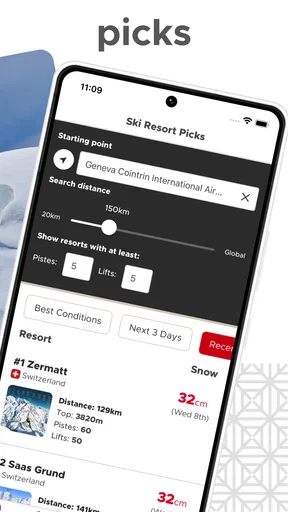
If you already have a trip in mind, use the resort forecast as a comparison tool rather than browsing at random. Check the same destination over more than one visit, so you can tell the difference between a brief change in the outlook and a pattern that might affect your plans. If you’re still choosing where to go, compare a small shortlist instead of trying to track every resort you’ve heard of.
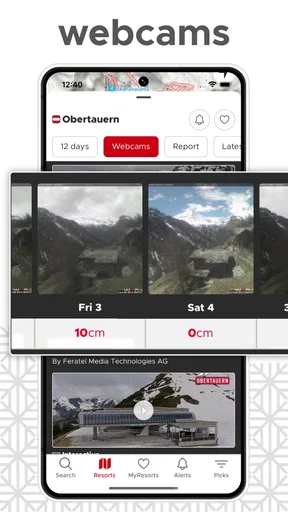
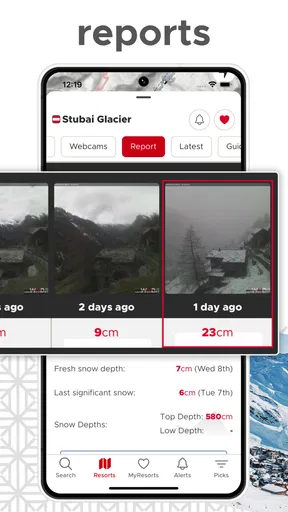
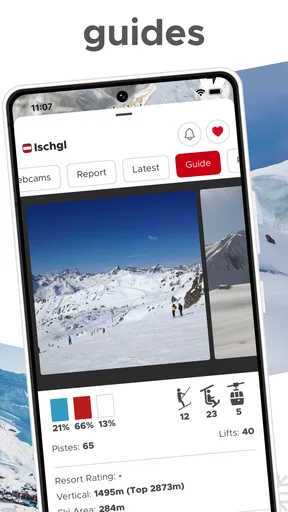
The app’s store summary points to forecasts, snow reports, and resort webcams, which gives a new user a useful sequence to follow: start with the forecast, use the report to put current conditions in context, and look at a webcam when seeing the resort matters more than reading another prediction. I find that kind of cross-check more sensible than making a travel decision from one forecast number alone.
Worth Reading Before You Choose

EA SPORTS FC Mobile 26 Is a Bigger Football Game, but It Takes Time

Flipboard Shows What News Apps Must Do Beyond the Feed

Switching to Android Auto Means Rethinking Your Driving Routine

Google Calendar Makes a Crowded Week Easier to Manage

Ludo King Makes the Most of the Minutes Between Plans

Baby Panda World Brings Quick Play to Modern Phones, but Its Game Library Feels Busy
Making the information work for a real trip
Imagine I’m deciding on Friday whether to drive to the mountains on Saturday. I’d first check the resort I’m considering, then compare its outlook with another plausible destination. If the forecast makes one option look more promising, I’d use the snow report and webcam as a reality check before packing. That workflow does not remove uncertainty, but it can help me avoid choosing a resort based only on habit.
A useful habit is to separate trip decisions into two stages. Several days ahead, use the forecast to decide whether the trip is worth planning and which resort deserves attention. Closer to departure, revisit the information and check what conditions look like at the destination. This keeps a longer-range outlook in its proper role: a way to narrow choices, not a last-minute substitute for checking the mountain.
Webcams can also answer a question that a forecast cannot settle for me: what does the resort look like right now? I’d use them to get a visual impression before leaving, while remembering that one camera view cannot represent every run, elevation, or corner of a large ski area. A webcam is a useful second opinion, not a complete picture of the day.
Where it fits, and where it may not
Snow-Forecast.com is a natural fit for skiers, snowboarders, and people organizing a winter break around resort conditions. It may also help a family decide whether to keep watching one destination or consider another. If your plans depend on snow at a particular mountain, this specialized focus is more relevant than a general weather app’s broad local forecast.
On the other hand, I wouldn’t choose it as my only weather app if I mainly need everyday forecasts for commuting, errands, or a city break. A general weather service is usually the more convenient choice for rain, wind, and temperatures across ordinary locations. And if I rarely visit ski areas, the resort-centered information would have little reason to stay in my daily routine.
There’s a practical trade-off in specialization: the app can center the details snow travelers care about, but a newcomer may need a little time to decide which information is most useful. I’d resist trying to interpret every graph on the first visit. Begin with the destination and dates that matter, then explore extra details only when they help answer a specific planning question.
First Impressions: Setting the Stage
When I first opened the Snow-Forecast.com app, I was greeted with a clean and intuitive interface. It’s like it knew exactly what I wanted—a no-nonsense approach to getting all the snow updates I could ever need. Whether you’re a seasoned snowboarder or just someone planning a cozy winter retreat, this app seems to have all the bases covered.
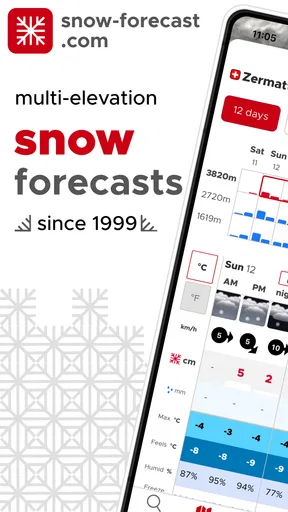
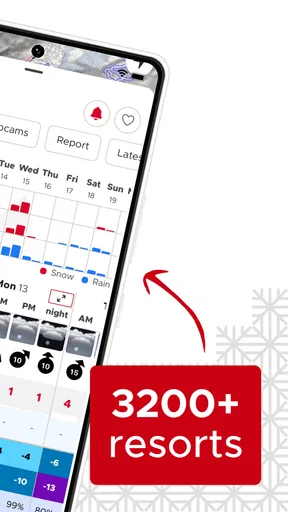
The layout is straightforward, which is great because who has time to navigate through endless menus when you’re trying to plan your next snow adventure? The app offers detailed weather forecasts for more than 3,000 ski resorts worldwide, which is pretty impressive.
Features That Stand Out
One of the coolest features of this app is the 7-day weather forecast. It gives you a day-by-day breakdown of what to expect at your chosen resort. From snowfall predictions to temperature highs and lows, it’s all there. And let me tell you, the accuracy is spot on. I’ve found myself checking it religiously before making any plans.
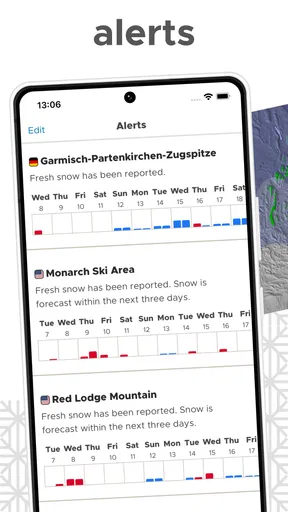
Another handy feature is the snow alerts. You can set these up to notify you when your favorite resort is expecting fresh powder. It’s like having a personal snow butler, ensuring you never miss the perfect skiing conditions.
For the more data-inclined among us, the app offers detailed graphs and charts that show historical snow data. It’s a treasure trove of information if you’re into analyzing past trends to predict future conditions.
Usability: Smooth Sailing or Rocky Slopes?
Using the app feels pretty seamless. Navigating between screens is smooth, and I didn’t notice any lagging or crashes, which is always a plus. The app’s design is minimalistic, making it easy on the eyes and ensuring the data is front and center without unnecessary distractions.
The only hiccup I encountered was minor—sometimes the loading times for certain resorts felt a tad long. But honestly, with the amount of data being pulled in, it’s understandable. Patience is a virtue, right?
Who Is This App For?
This app is a dream come true for snow enthusiasts, whether you’re a casual skier or a hardcore snow junkie. Families planning a winter vacation will also find it invaluable, as it helps in choosing the best time and place to get those perfect snowy conditions.
However, if you’re not into snow sports or don’t live near any ski resorts, you might not find as much utility in this app. But for the rest of us, it’s a game-changer.
Final Thoughts: Hit the Download Button?
Overall, Snow-Forecast.com is a fantastic tool for anyone who loves snow and wants to make the most out of their winter adventures. With its detailed forecasts, user-friendly interface, and reliable data, it’s definitely worth giving a try.
So, if you’re ready to embrace the winter wonderland and need a reliable companion to guide you through the snowy trails, go ahead and hit that download button. Trust me, you won’t regret it.
A few sensible habits for better planning
I’d save alerts for resorts I’m genuinely considering, rather than turning them on for a long list. Too many notifications can become background noise, and the point is to notice a potentially useful change without having to monitor every destination. If an alert catches my eye, I’d open the resort details and reassess the whole trip rather than assume the alert alone means conditions will suit my plans.
Historical charts are most helpful when I have a specific question, such as whether a resort’s conditions tend to vary around the time I usually travel. I wouldn’t use past patterns to predict what will happen on a particular day; history is context, not a forecast. That distinction makes the charts more useful and keeps me from reading certainty into information that can only describe earlier conditions.
For a group trip, I’d use the app to get everyone looking at the same shortlist of resorts before debating logistics. It can help separate “we want snow” from the more practical question of which destination currently looks worth considering. Then the group can weigh travel time, budget, and skill level separately instead of expecting a weather app to settle every part of the decision.
Questions I’d settle before relying on it
Is it useful if I’m new to skiing? Yes, as a way to follow a resort and build a basic picture of the outlook, but I wouldn’t expect a forecast to teach mountain safety or tell me whether a particular run is appropriate for my ability. For those decisions, I’d use the resort’s own current guidance and make choices suited to the conditions and my experience.
Should I pay straight away? I wouldn’t. The app is free to install, so I’d first see whether the resort information and planning routine are valuable to me. The listed in-app purchases range from $5.99 to $22.99 per item, but a price by itself doesn’t tell me whether an option is worthwhile; I’d only consider one after checking what it offers in the app and deciding that I need it.
Can it replace a normal weather app? Not for most people’s everyday needs. Its appeal is the resort-and-snow perspective, whereas a general forecast is a better fit when I need weather for a street address, a commute, or a range of non-mountain destinations. I’d keep the specialist tool for snow trips and use a broader service for the rest of the week.
Does a good-looking forecast mean I should commit? I’d treat it as a reason to investigate, not an automatic green light. Conditions can change, and a forecast, snow report, or camera view each answers a different part of the question. Checking them together, then revisiting the plan closer to departure, is a more reliable workflow than making a costly decision from one glance.
The right fit for a snow-season routine
The app is best when snow conditions influence a decision you actually need to make: whether to plan a trip, which resort to keep an eye on, or when to take a closer look before leaving. Its forecasts, reports, webcams, alerts, and historical information give me several ways to approach those questions, while still leaving room for judgment and a last-minute check.
It is less compelling as a general-purpose weather companion, and its mountain focus may feel like too much if you only ski once in a while. For regular resort visitors, though, it offers a focused place to organize a snow check without pretending that a forecast can guarantee a perfect day. I’d install it if mountain trips are part of my winter plans, start with one resort I care about, and let its usefulness earn a larger place in my routine.
Pros
- Detailed weather data for ski resorts.
- User-friendly interface for easy navigation.
- Accurate snowfall predictions.
- Customizable alerts for conditions.
- Wide global coverage of locations.
Cons
- Limited offline functionality.
- Ads can be intrusive at times.
- Requires internet for updates.
- Some features behind a paywall.
- Occasional loading delays.
FAQs for Snow-Forecast.com Weather Maps
What features does the Snow-Forecast.com app offer?
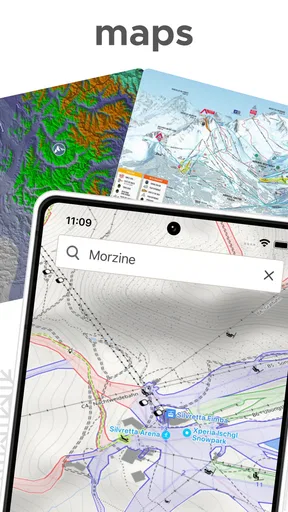
The Snow-Forecast.com app provides detailed weather forecasts and snow reports for over 3,000 ski resorts worldwide. Users can access up-to-date information on snowfall, temperature, wind speeds, and more. The app also offers interactive maps, webcams, and personalized alerts to keep users informed about their favorite resorts.
Is the Snow-Forecast.com app free to use?
The Snow-Forecast.com app is free to download and offers a range of features for users without charge. However, there is a premium subscription option available that unlocks additional features such as extended forecasts, ad removal, and enhanced map functionalities. Users can choose the plan that best fits their needs.
How accurate are the snow forecasts provided by the app?
The Snow-Forecast.com app is known for its reliable and precise forecasts, utilizing data from reputable meteorological sources. While no weather forecast can guarantee absolute accuracy, the app uses advanced modeling techniques to offer highly reliable predictions. Users can check real-time updates for the most current information.
Can I set up notifications for specific ski resorts?
Yes, the Snow-Forecast.com app allows users to set up personalized notifications for their favorite ski resorts. This feature ensures that users receive timely alerts about snowfall, weather changes, and other relevant updates. Notifications can be customized according to user preference to ensure a tailored experience.
Is the app available for both Android and iOS devices?
The Snow-Forecast.com app is available for download on both Android and iOS platforms. Users can find the app on Google Play Store for Android devices and the Apple App Store for iOS devices. This ensures a wide range of users can access the app's features regardless of their device preference.


